Free Printable Signature Practice Sheet (PDF)
If you want a better signature, you have to practice it, and the back of an envelope isn't much help. This free sheet gives you warm-up strokes, slant guides, a page to try three versions and test them small, and a clean box to sign your final version so it photographs well. Print it, grab a black pen, and you're set. No sign-up, no email, no app needed.
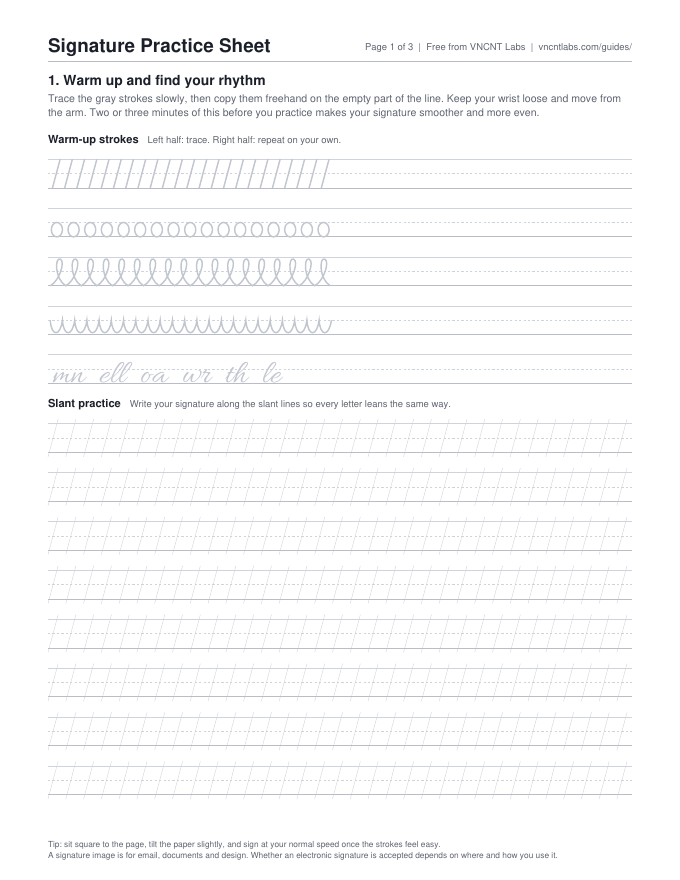
What's on the sheet
- Page 1, warm up: five rows of gray strokes to trace (slants, ovals, loops, garlands and common letter joins), then eight rows of slant guides to write your signature at a steady angle.
- Page 2, try three versions: rows for your full name, your first initial and surname, and your initials, then size boxes 3, 2 and 1 inches wide and a four-point checklist to pick the winner.
- Page 3, your final signature: a large box with corner marks for your full signature, two smaller boxes for a short version and initials, and steps for turning a photo into a clean signature image.
How to use it
- Print at 100% (Actual size), so the size boxes on page 2 are true to size.
- Spend two or three minutes on the page 1 warm-ups before each practice session.
- Fill page 2 with all three versions. Sign each one in the size boxes and tick the checklist.
- Practice your chosen version on the slant guides for a few minutes a day. Print more copies of page 1 as you need them.
- When it feels natural, sign the boxes on page 3 with a black pen and photograph them.
From paper to a signature image
- Lay page 3 flat in daylight or under a bright lamp.
- Hold your phone flat above it so there's no shadow, and photograph it straight on.
- Crop to the corner marks.
- Use it as is on white documents, or turn it into a transparent PNG for email and PDFs. Then follow our guides to add it to Gmail, Outlook or Apple Mail or to a PDF on your phone.
On a Mac, Preview can also capture a signature straight from white paper with the built-in camera. Acrobat Reader on iPhone and Android can make a signature from an image or the camera.
Want to skip the photo cleanup? Signstroke, our Android app, can photograph your signature, remove the paper and save a transparent PNG.
A quick note on signatures. Create a signature image for email, documents and design. Whether an electronic signature is accepted depends on where and how you use it. If a document asks you to sign through a specific link or service, use that. A pasted image doesn't replace it.
Common questions
Is it really free?
Yes. The PDF is free to download, print and share. There's no sign-up and no email.
I use A4 paper. Will it print?
Yes. It's US Letter, so choose Fit or Scale to fit in your print settings. The size boxes will then be slightly smaller than the labels say.
Is this a government or legal form?
No. It's a practice sheet from VNCNT Labs for designing and practicing your own signature.
Do I need the Signstroke app?
No. The sheet works on its own with a pen and your phone camera. The app is optional if you want the cleanup done for you.
Signstroke and this guide are made by VNCNT Labs. We are not affiliated with Google, Microsoft, Apple or Adobe. Create a signature image for email, documents and design. Whether an electronic signature is accepted depends on where and how you use it. Menu names come from each company's help pages and can change; if a step looks different on your device, check the linked source.
Sources
- Apple Support: Fill out and sign PDF forms in Preview on Mac
- Adobe: Fill and sign documents in Acrobat on mobile
- Adobe: Create signatures and sign, Acrobat for iOS Help