Review Request Tracker
Tested on: Google Sheets (Nov 2026), LibreOffice 25.2. Also ships as a standard .xlsx file.
You finish a great clean, mean to ask for a review, and then the week gets busy. Ten days later, asking feels awkward. This sheet tells you each morning who to ask, with the message already written, and asks every recent customer the same way.
$7 download · 14-day refund policy · [email protected]
A look inside
Every screenshot uses a made-up business, Brightwell Home Cleaning. The customers, phone numbers and emails are invented.
What it does
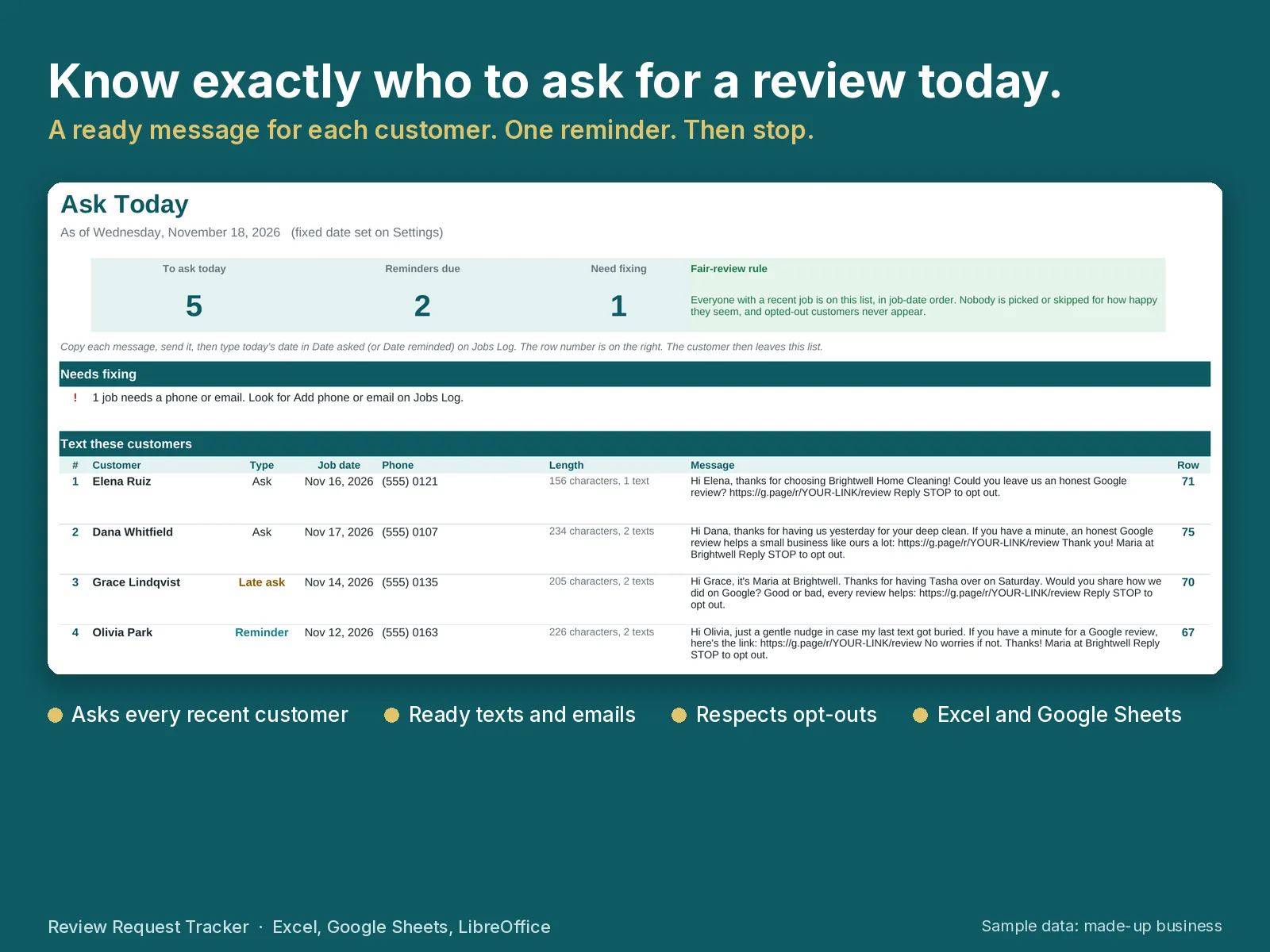
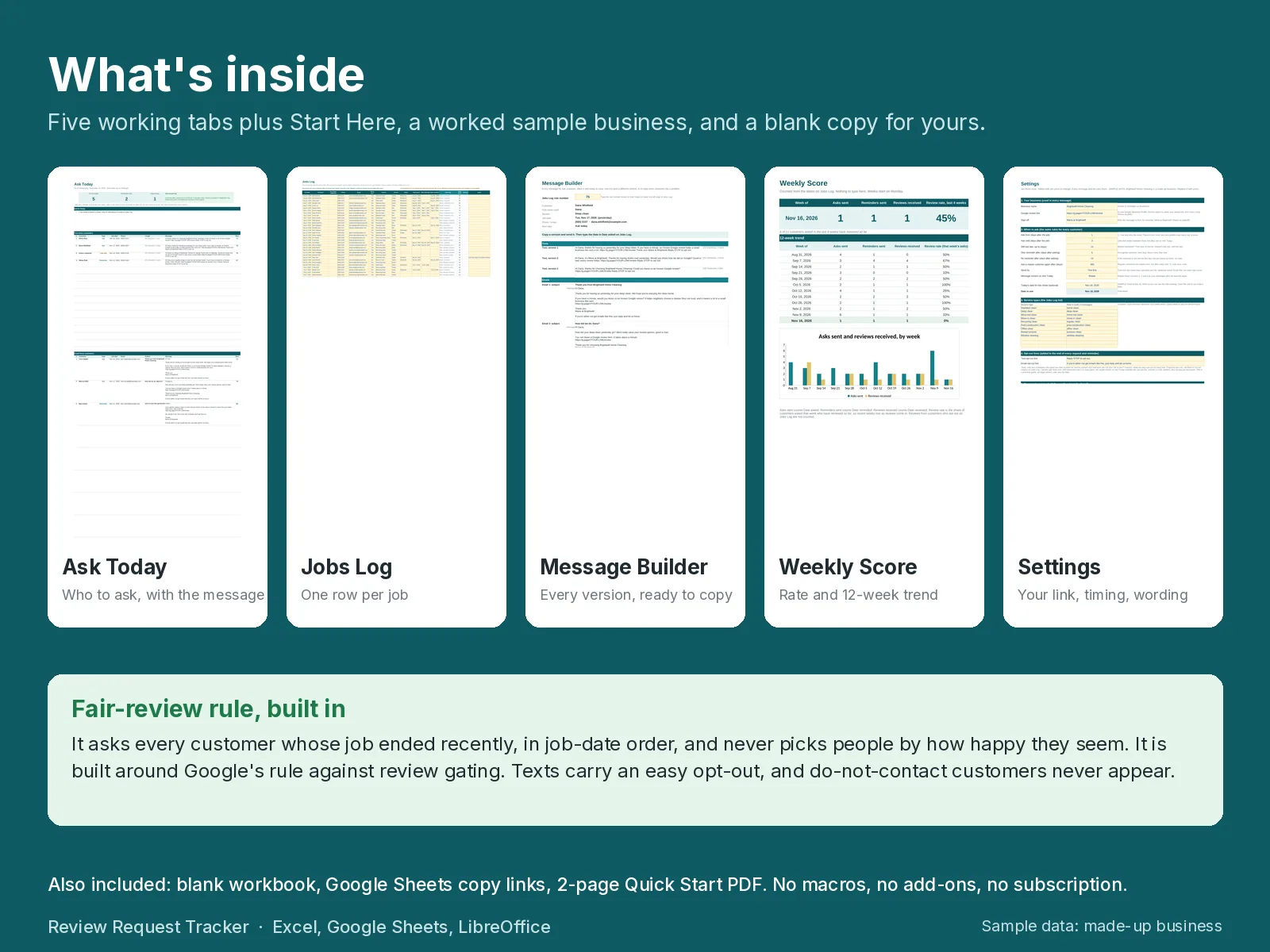
Log each job once. Every morning the Ask Today tab shows who to ask, split into a text list and an email list, each with the message ready to copy. About 5 minutes a day.
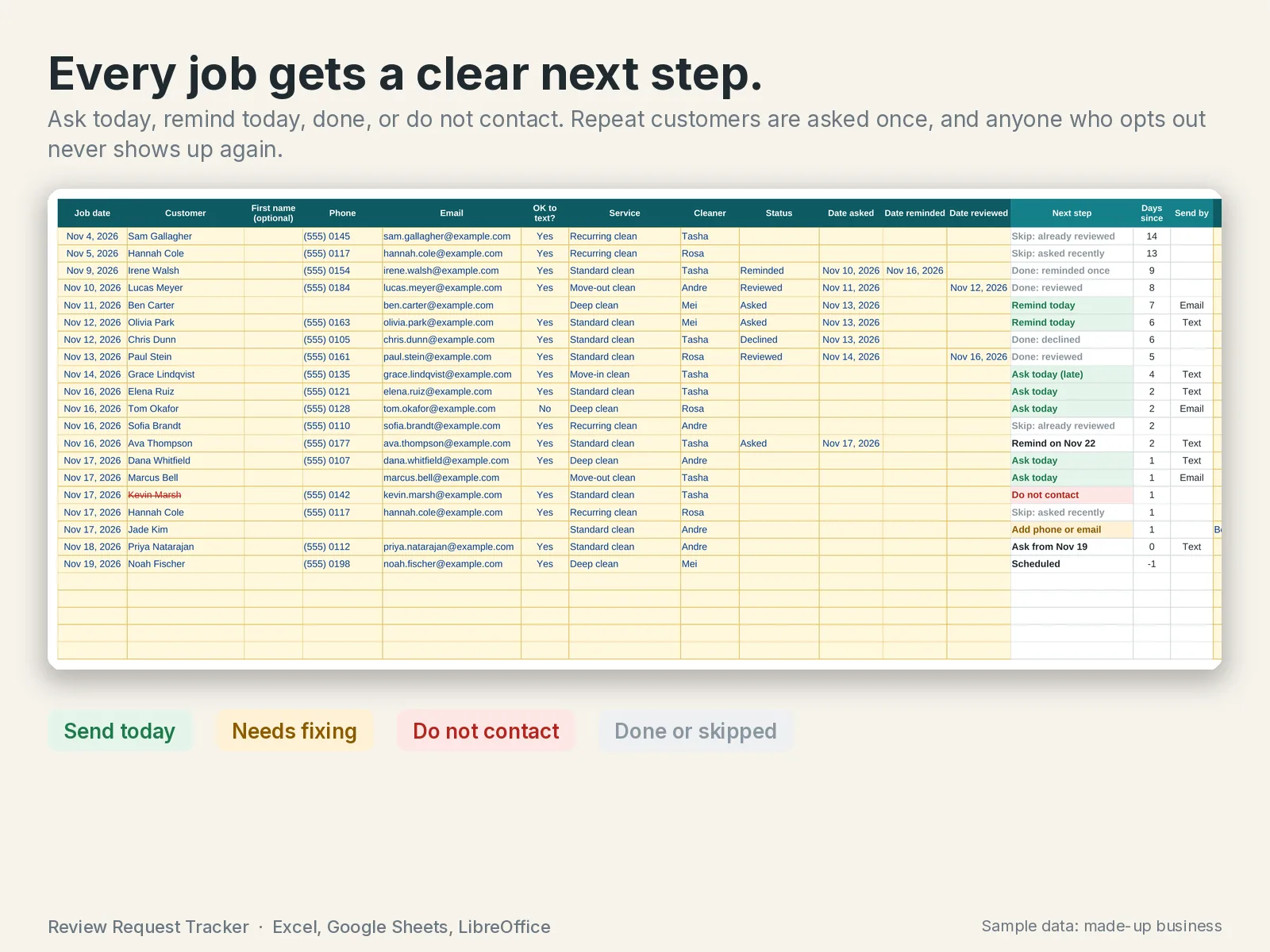
- Ask Today list. Jobs that ended 1 to 3 days ago and have not been asked. Missed asks stay on as a late ask until day 14.
- One reminder, then stop. If no review comes in, the customer comes back once about 5 days after the ask. After that the tracker leaves them alone.
- Fair to every customer. Customers are picked by job date only, never by how happy they seem. That follows Google's rule against review gating and the FTC's 2024 rule on consumer reviews.
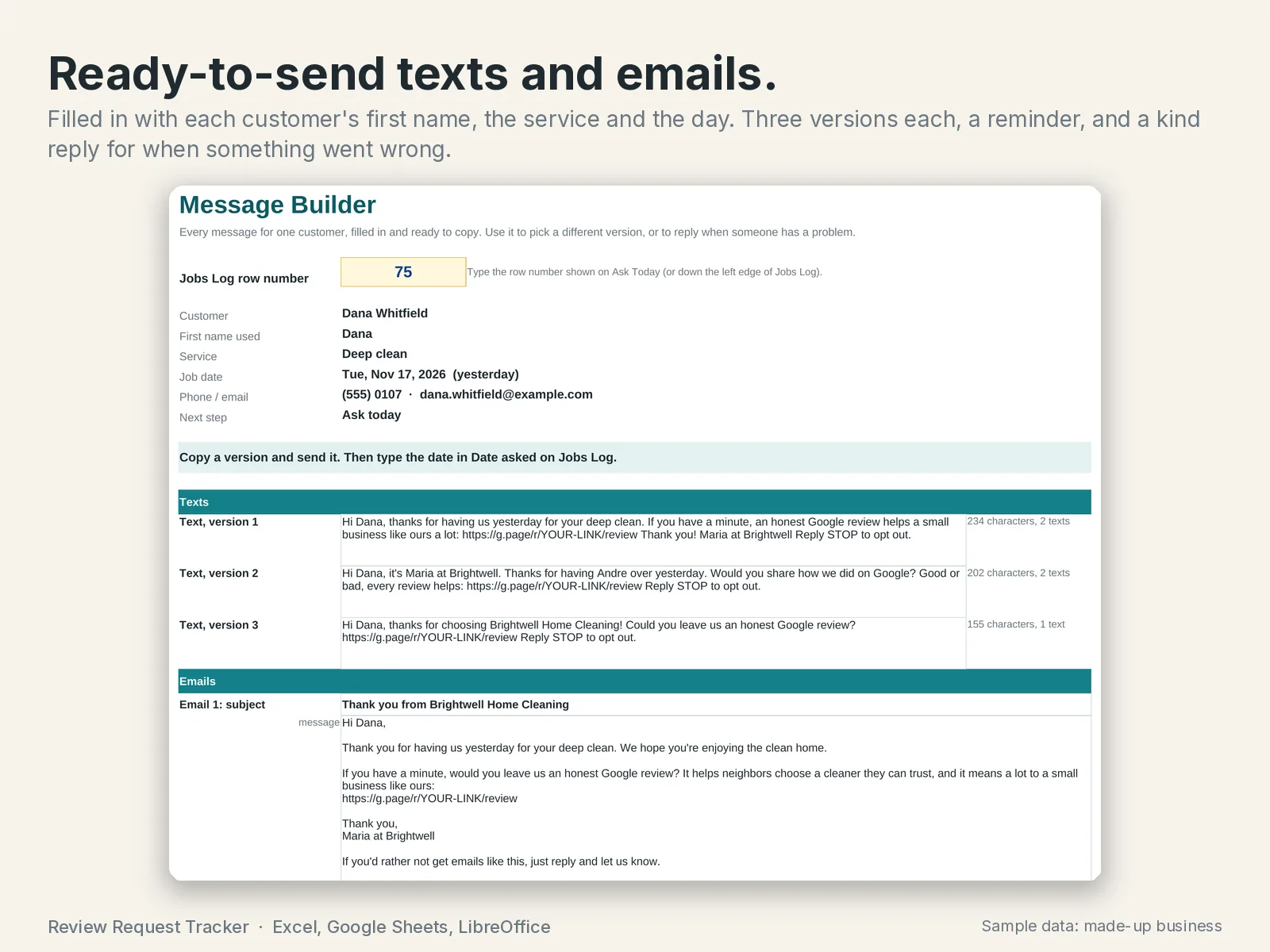
- Ready messages. Three text versions and three email versions, filled in with your business name, review link, sign-off and the customer's first name, service and day. Edit the wording on Settings.
- A reply for when something went wrong. A short text and email that apologize and offer to come back and fix it, without asking for a review.
- Opt-outs respected. Only customers marked OK to text get texts, and every text ends with "Reply STOP to opt out." Mark a customer Do not contact and they never appear again.
- Repeat customers asked once. Weekly and biweekly clients are not asked after every visit. Set a re-ask gap if you want.
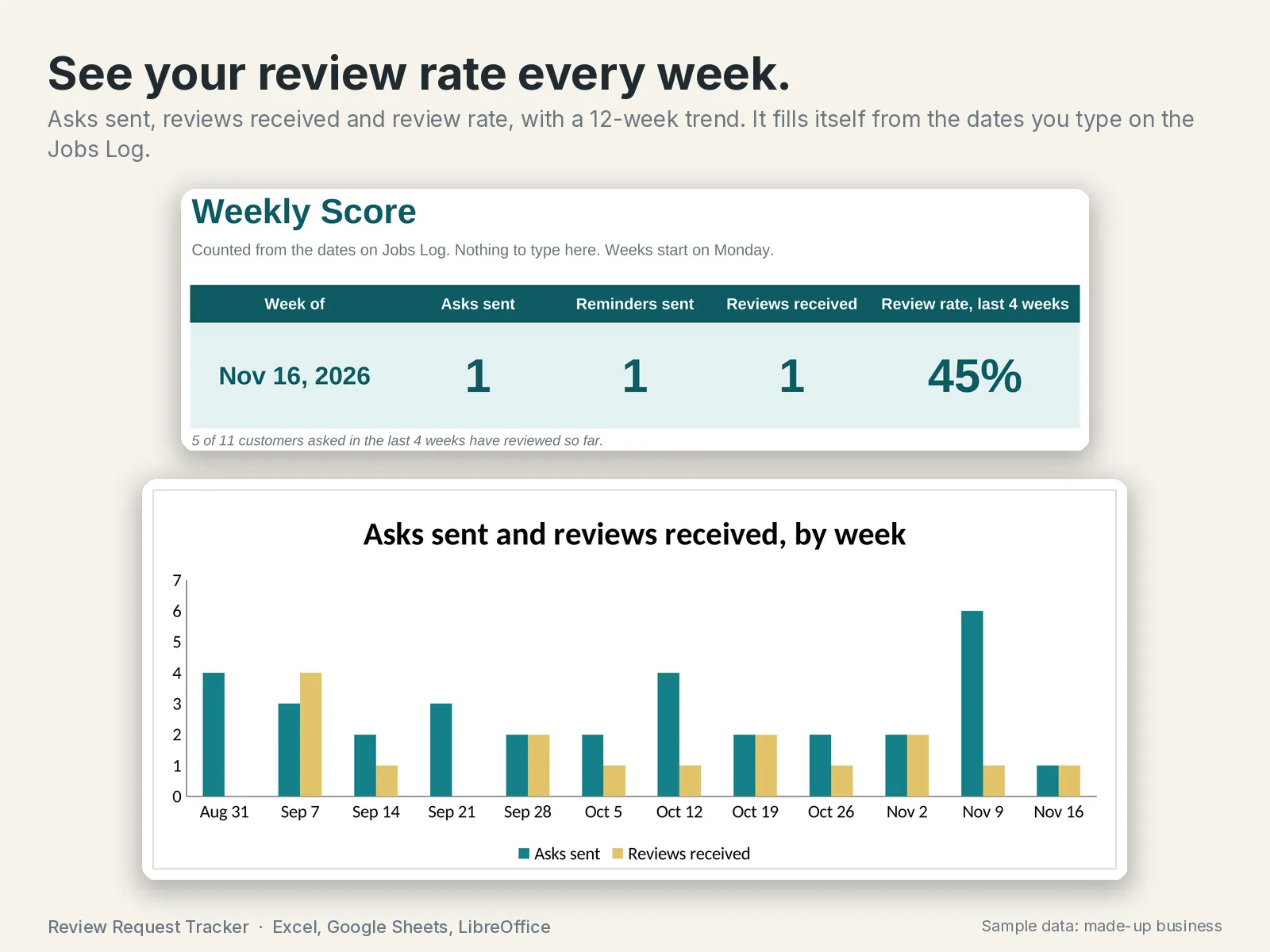
- Weekly Score. Asks sent, reminders, reviews received and your review rate for the last 4 weeks, with a 12-week trend chart.
- Needs fixing. Flags jobs with no phone or email, dates in the wrong order and missing settings.
What is inside the download
- Review-Request-Tracker_SAMPLE.xlsx: filled in with a made-up business so you can see full lists and messages right away
- Review-Request-Tracker_BLANK.xlsx: the same tracker, ready for your business
- Google Sheets copy links for both versions (in the Quick Start PDF)
- Quick Start PDF (2 pages): set up in about 5 minutes, with a worked example
- Six tabs: Start Here, Ask Today, Jobs Log, Message Builder, Weekly Score, Settings
No macros, no add-ons, no subscription, and it never sends anything by itself. You copy each message and send it from your own phone or email. Formula cells are locked so they cannot be broken by accident, and you can unprotect the sheets (no password) to change the layout.
Questions
Do I need Excel?
No. It works in Google Sheets (free) through the copy link, and in LibreOffice. It also comes as a standard .xlsx file.
Does it send the texts and emails for me?
No. It writes them and tells you who to send them to. You copy and send from your own phone or email, so messages come from you.
Why does it ask every customer, even unhappy ones?
Asking only the customers you expect to be happy is review gating, which Google's review policy does not allow. The tracker asks everyone the same way. If someone tells you about a problem, use the reply message to fix it.
Where do I get my Google review link?
In your Google Business Profile, find the option to share your review link, then copy it. Paste it once on Settings.
What about the texting rules?
Only text customers who gave you their number for service contact and said texts are OK. Every text includes an opt-out. This is a practical guide, not legal advice.
How many jobs does it hold?
500 jobs. When the log fills up, start a fresh copy and carry over the customers marked Do not contact.
Can I share it with my team?
Yes, inside your own business. Please do not resell or share the files or copy links publicly.
Can I offer a discount or gift for a review?
Don't. The FTC's 2024 rule on consumer reviews bans buying reviews and hiding bad ones, and Google's review policy bans review gating. The tracker asks every recent customer the same way and never offers anything in return. This is a practical guide, not legal advice.
Has it been tested in Excel?
It was tested in Google Sheets and LibreOffice 25.2. The file is a standard .xlsx with no macros, but a desktop Excel check is still pending. If something looks wrong in Excel, use the Google Sheets copy link and email us.
How much time does it take?
About 5 minutes to set up and about 5 minutes a day: add finished jobs, then copy and send the messages on Ask Today.
Does it work if I'm not a cleaning business?
It's built and worded for cleaning businesses, and the sample is a cleaning company. You can edit the service names and messages on Settings, but other trades haven't been tested.
What if it's not right for me?
Email [email protected] within 14 days of purchase with your order number for a refund. See the Refund Policy.
Pairs with
Cleaning Quote Calculator: price every job above your real cost and send a one-page quote. $12.
Am I Undercharging?: the free price check. Find your floor price for a typical clean in about 2 minutes.
Profit per Client: see which recurring clients make you money and what to charge the ones that don't. $12.
Cleaning Business Suite: this tool plus the other two in one download. $22 for all three ($31 separately).
License, refunds and support
This is a downloadable, self-serve spreadsheet, not accounting, tax or legal advice. Use it in your own business. Do not resell or redistribute the files.
Refunds within 14 days of purchase: see the Refund Policy or email [email protected] with your order number.
Compatibility notes
- Google Sheets: open the copy link and choose Make a copy. Formulas, dropdowns, colors and the chart carry over. Sheets shows warnings on the calculated cells instead of locking them.
- Excel: standard .xlsx, no macros. Tested on Google Sheets and LibreOffice 25.2, which match on every formula cell. The workbooks use only standard Excel 2010-compatible functions; a desktop Excel open-check is still pending.
- LibreOffice Calc 7 or later: supported.
- Numbers (Mac/iPad): not supported.
- Carriers split texts over 160 characters into 2 or more parts. The length shown on Ask Today includes the opt-out line.
- Reviews count on Weekly Score only for customers on the Jobs Log, from the Date reviewed you type in.
Review Request Tracker
Sold by FAMVII LLC dba VNCNT Labs. Sample business and figures are made up. Not accounting, tax or legal advice.