Cleaning Business Suite
Tested on: Google Sheets (Nov 2026) and LibreOffice 25.2. Also ships as standard .xlsx files.
Price new jobs, check the clients you already have, and ask every customer for a review. The three VNCNT Labs cleaning spreadsheets in one purchase, $22 instead of $31 bought separately.
$22 download · 14-day refund policy · [email protected]
A look inside
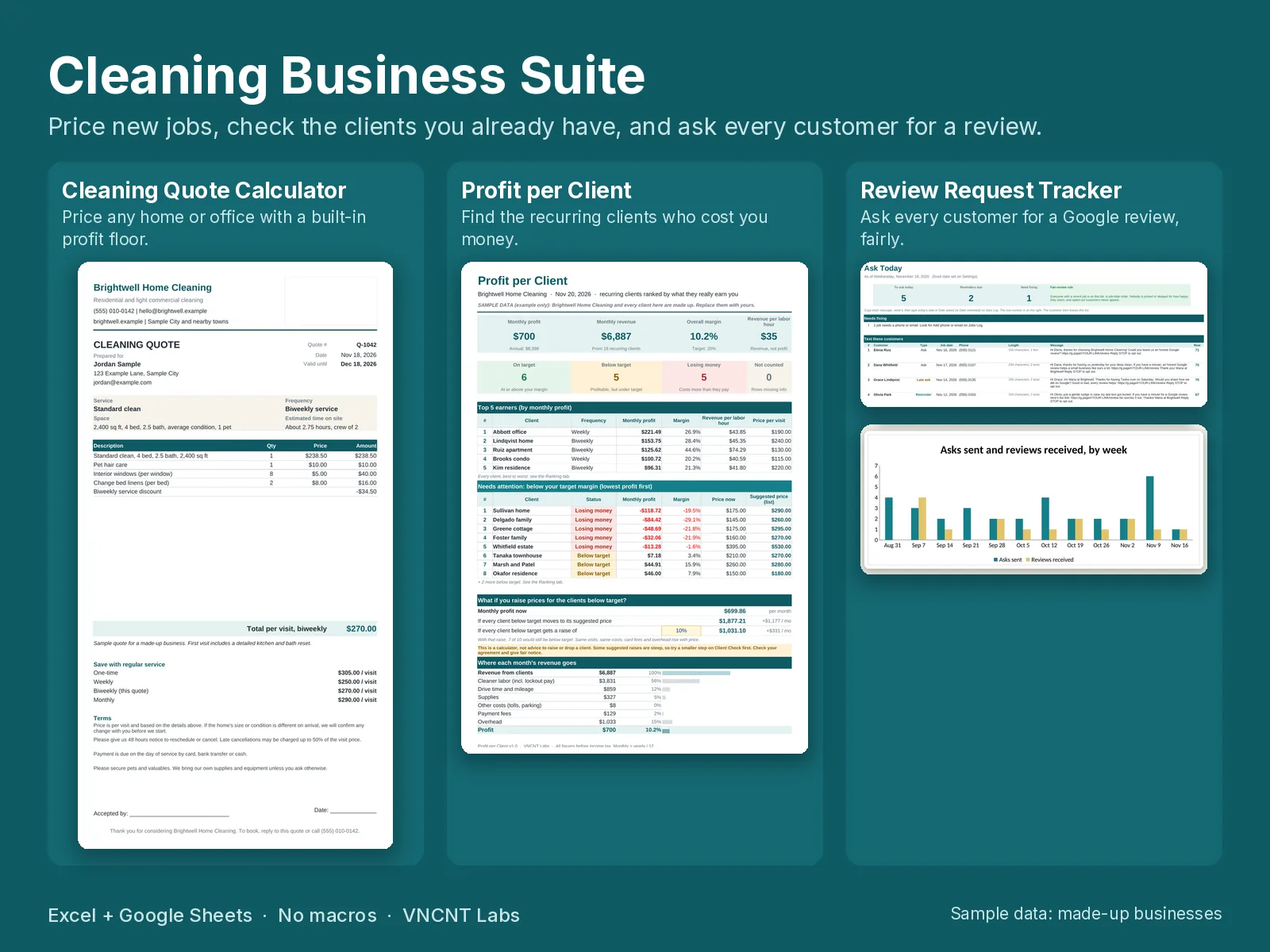
Every screenshot uses made-up businesses and customers (example data).
What is included
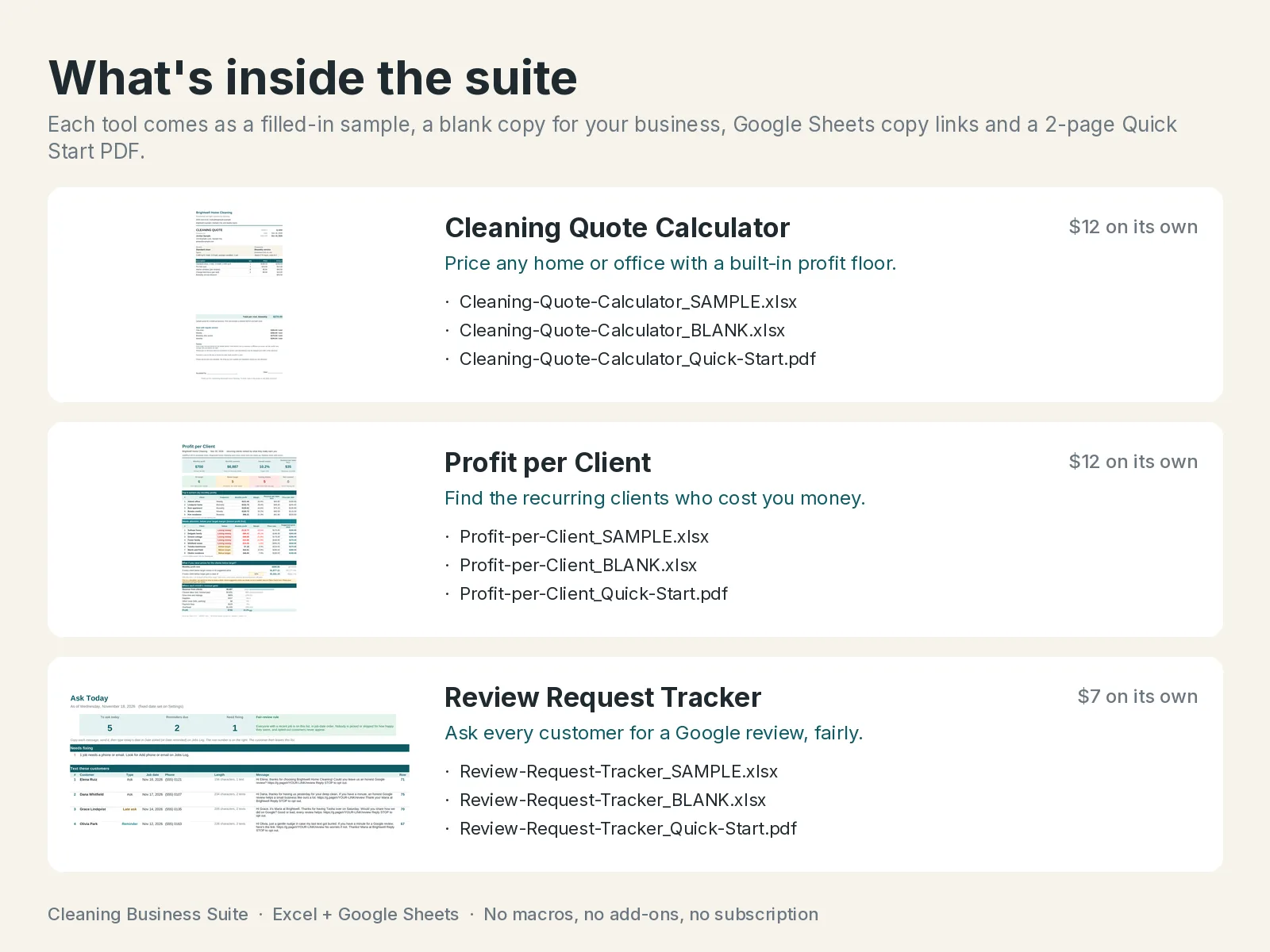
- Cleaning Quote Calculator ($12 on its own). Quote any home or office in about two minutes once your Settings are filled in. A profit floor from your own costs, so recommended prices never go below it, and a one-page quote ready to send.
- Profit per Client ($12 on its own). The true cost and profit of every recurring client, green, amber or red against your margin, a suggested price for the ones that fall short, and a one-page Summary.
- Review Request Tracker ($7 on its own). Who to ask for a Google review today, with the text or email already written. One reminder, then stop.
Each tool comes as a filled-in sample, a blank copy for your business, Google Sheets copy links and a 2-page Quick Start PDF: 9 files in total (2 workbooks and 1 PDF per tool). Gumroad adds the three tools to your library as three separate products, so you download each one from its own page and get its future updates. No macros, no add-ons, no subscription.
Free: 3 prompts to fill these sheets faster
Copy a prompt, paste it into any AI chat assistant, add your notes at the bottom, and you get back values ready to type into the sheet. Free, nothing to sign up for. The sheet still does all the math.
Privacy first. Do not paste client names, addresses, phone numbers or other personal data into a third-party chatbot. Use initials or made-up labels such as "Client A" and keep the real details in your own files.
1. Walkthrough notes to Quote Builder inputs
Turns your walkthrough notes into the clean type, frequency, size, bedrooms, bathrooms, condition, pets, drive and add-ons for the Quote Builder tab. It uses the exact dropdown values from the sheet and asks you about anything your notes did not say.
You are helping a cleaning business owner fill in a spreadsheet. Read my walkthrough notes below and return the values to type into the Quote Builder tab, one per line, using exactly these labels.

Clean type: pick one of: Standard clean, Deep clean, Move-in / move-out, Post-construction, Commercial (per sq ft)
Frequency: pick one of: One-time, Weekly, Biweekly, Monthly
Home or space size (sq ft): a whole number
Bedrooms: a whole number (0 for commercial)
Bathrooms: a number, half baths count as 0.5 (restrooms for commercial)
Condition: pick one of: Light, Average, Heavy, Extreme
Pets: a whole number of pets
Crew size: a whole number, or leave blank if I did not say
Round-trip drive time (minutes): a whole number, or leave blank if I did not say
Round-trip miles: a number, or leave blank if I did not say
Add-ons: one line per add-on as "name: quantity". Use only names from this list (separated by " | "), and a whole number for the quantity: Inside oven | Inside fridge | Interior windows | Baseboards, hand wiped | Laundry, wash dry fold | Inside kitchen cabinets | Change bed linens | Blinds, dusted and wiped | Wall spot cleaning | Dishes, wash and put away | Garage sweep | Patio or balcony

Rules:
- Use only what my notes say. If a value is missing or unclear, write ASK and add one short question after the list. Do not guess.
- Condition: Light = tidy, cleaned often. Average = normal lived-in. Heavy = weeks of build-up or clutter. Extreme = months of build-up.
- If my add-on list on the Settings tab has different names, use my names instead of the list above.
- Return only the list and any questions. No other text.

My walkthrough notes (use initials or made-up labels, no real names, addresses or phone numbers):
[PASTE NOTES HERE]
Fills in: Cleaning Quote Calculator ($12) Cleaning Business Suite ($22 for all three)
2. Client list to Profit per Client rows
Turns a plain list of recurring clients into the labeled values for each row of the Clients tab: frequency, price, discount, hours, crew, drive, payment method and lockouts. Missing values are left out and flagged, never guessed.
You are helping a cleaning business owner fill in a spreadsheet. Below is my list of recurring clients. For each client, return a block of lines to type into one row of the Clients tab, in this order and with exactly these labels:

Client: my label for them, exactly as I wrote it (initials or a made-up label)
Frequency: one of Weekly, Biweekly, Every 3 weeks, Every 4 weeks, Monthly
Price per visit: dollars, no $ sign
Discount: a percent such as 10%
Add-on income per visit (average): dollars
Hours on site per visit: a number such as 1.75
Crew size: a whole number
Drive minutes (round trip): a whole number
Miles (round trip): a number
Supplies per visit: dollars
Other cost per visit (tolls, parking): dollars
Payment method: one of Card, Bank debit (ACH), Cash, check or Zelle
Lockouts or late cancels per year: a whole number

Rules:
- Use only what my list says. If a value is missing, leave out that line completely. Never guess a number.
- The sheet fills in your Settings defaults for a blank Crew size, Supplies per visit and Payment method, so leaving those out is fine.
- Drive minutes and miles are for the round trip. If I gave a one-way figure, double it and say so in a "Check" line at the end of that client's block.
- "Twice a month" or "every other week" is Biweekly. "Every month" is Monthly.
- After each block, add one "Check" line only if something important is missing (for example hours on site) or you changed a figure. Otherwise no Check line.
- Put a blank line between clients. Return only the blocks. No other text.

My client list (use initials or made-up labels, no real names, addresses or phone numbers):
[PASTE LIST HERE]
Fills in: Profit per Client ($12) Cleaning Business Suite ($22 for all three)
3. Check a customer's price ask against your profit floor
Paste the numbers from your Quote Builder and what the customer wants to pay. You get a one-line check against your profit floor, fair options that stay above it, and a short polite reply that does not mention your costs.
You are helping a cleaning business owner answer a customer who wants a lower price. I will paste the numbers from my Quote Builder tab. Compare the customer's ask with my profit floor and write a short reply I can send.

Numbers from my Quote Builder:
Quote price per visit: [PASTE]
Profit floor (lowest safe price): [PASTE]
Profit margin: [PASTE]
Revenue per labor hour: [PASTE]
Labor hours (all cleaners combined): [PASTE]
Frequency: [PASTE]
The customer is asking for: [PASTE A PRICE PER VISIT, OR WHAT THEY SAID]

Do this:
1. Say in one line whether the customer's price is at or above the floor, or below it, and by how many dollars.
2. If it is below the floor, do not agree to it. Suggest one or two fair options that stay at or above the floor, such as a smaller scope, a different frequency, or fewer add-ons. Use only numbers I gave you. Do not invent prices or discounts.
3. Write a friendly reply of 3 or 4 sentences I can send to the customer. Do not mention my floor, margin or costs in the reply, and do not name a new price in it.

Keep it plain and polite. Return the one-line check, the options, and the reply, and nothing else.
Fills in: Cleaning Quote Calculator ($12) Cleaning Business Suite ($22 for all three)
Tested on: each prompt was run once with an AI chat assistant on made-up notes (Nov 2026), and the answers were checked against the sheets' dropdown values. Compatibility notes: these are plain text prompts, so they work in any AI chat assistant, but answers can vary. Check every value against the sheet before you rely on it. VNCNT Labs is not affiliated with any AI company.
Questions
Do I need Excel?
No. All three work in Google Sheets (free) through the copy links, and in LibreOffice. They also come as standard .xlsx files.
Do the three tools connect to each other?
No. Each is a separate workbook. The Quote Calculator and Profit per Client use the same cost settings, so you can copy them across. The Review Request Tracker is for reviews only.
I already own one of them.
Gumroad does not subtract what you already bought. If you only own the Review Request Tracker, the other two cost $24 on their own, so the suite at $22 is still cheaper. If you already own the Quote Calculator, Profit per Client, or any two of the tools, buy the ones you are missing on their own pages instead.
Is the sample data real?
No. Every business, customer and number in the samples is made up.
Can I share it with my team?
Yes, inside your own business. Please do not resell or share the files or copy links publicly.
Has it been tested in Excel?
It was tested in Google Sheets and LibreOffice 25.2, which give the same result on every formula cell. The files are standard .xlsx with no macros, but a desktop Excel check is still pending. If something looks wrong in Excel, use the Google Sheets copy links and email us.
How long does setup take?
About 10 minutes each for the Quote Calculator and Profit per Client, and about 5 minutes for the Review Request Tracker. Each tool has a 2-page Quick Start PDF. The Quote Calculator and Profit per Client share the same cost settings, so the second one is quicker.
What isn't it?
It's three spreadsheets, not booking, scheduling or invoicing software. Nothing sends messages for you, and there's no account or subscription. The numbers come from what you type in, and they aren't tax, legal or financial advice.
Is there anything free to try first?
Yes. Am I Undercharging? is a free one-page price check. There are also three free prompts that help fill in the sheets.
What if it's not right for me?
Email [email protected] within 14 days of purchase with your order number for a refund. See the Refund Policy.
License, refunds and support
These are downloadable, self-serve spreadsheets, not accounting, tax or legal advice. Figures are before income tax and sales tax. Use them in your own business. Do not resell or redistribute the files.
Refunds within 14 days of purchase: see the Refund Policy or email [email protected] with your order number.
Compatibility notes
- Google Sheets: open a copy link and choose Make a copy. Formulas, dropdowns and colors carry over. Sheets shows warnings on the calculated cells instead of locking them. Print from File > Print and choose Fit to page.
- Excel: standard .xlsx files, no macros. Tested on Google Sheets and LibreOffice 25.2, which match on every formula cell. The workbooks use only standard Excel 2010-compatible functions; a desktop Excel open-check is still pending.
- LibreOffice Calc 7 or later: supported.
- Numbers (Mac/iPad): not supported.
- Amounts show in US dollars. To use another currency, change the cell format.
Cleaning Business Suite
Sold by FAMVII LLC dba VNCNT Labs. Sample businesses and figures are made up. Not accounting, tax or legal advice.