How to type today's date, or a date a few days out, with a shortcut
Dates are small, but they're easy to get wrong when you type them by hand, and working out “three business days from now” means checking a calendar. A snippet can do the math.
The free way: your keyboard and a calendar
- Some apps have their own date shortcut, for example Ctrl+; in Excel and Google Sheets, but web text boxes don't.
- Otherwise, check the date on your taskbar or menu bar and type it in the format you need.
- For a due date, count the days on a calendar, skipping Saturday and Sunday for business days.
The faster way
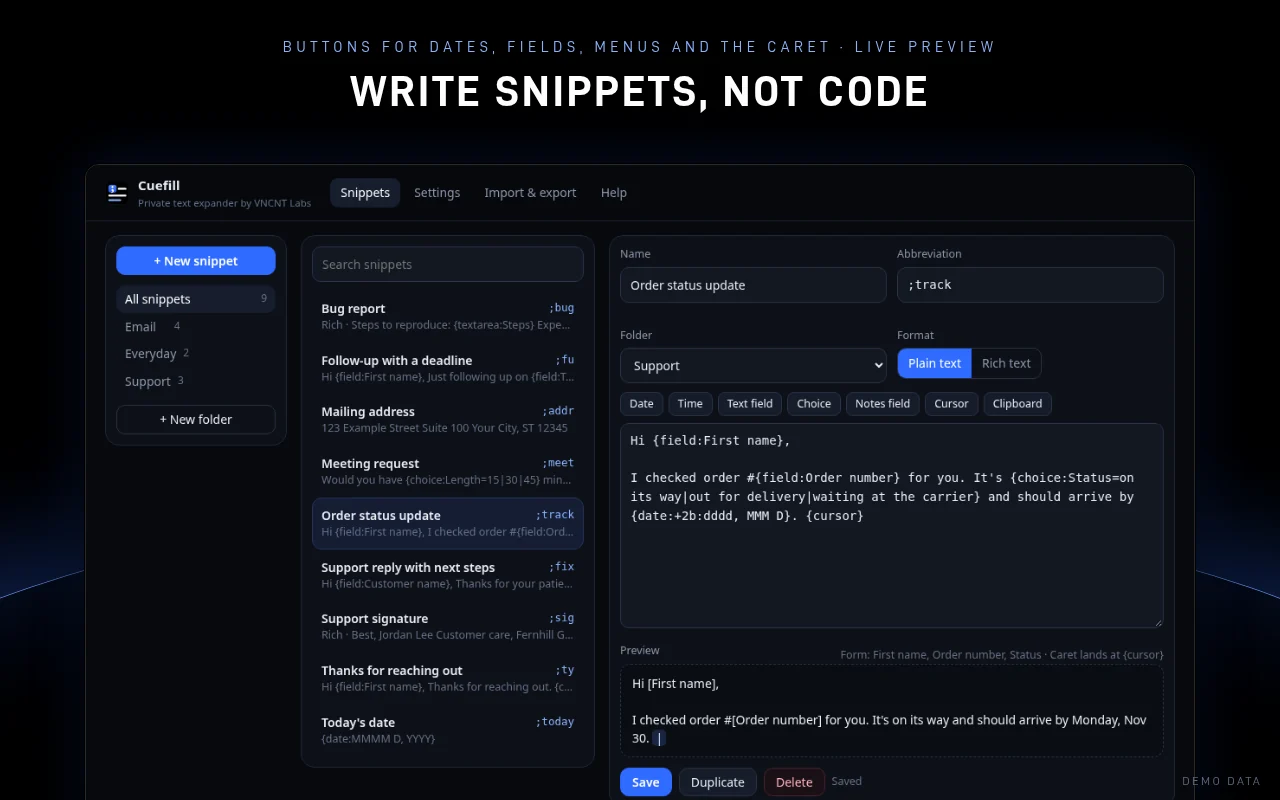
Cuefill comes with ;today, which types today's date like November 26, 2026. In your own snippets, {date:YYYY-MM-DD} picks the format, {date:+3d} is three days from now and {date:+2b:dddd, MMM D} is two business days from now, like “Monday, Nov 30”. {time} and {time:+1h:HH:mm} do the same for times.
Dates are worked out on your computer at the moment the snippet expands.
Cuefill is free, has no snippet cap, needs no account and sends nothing anywhere.
Microsoft Edge Add-ons: coming soonFirefox: coming soonOpera: coming soon
Microsoft and Edge are trademarks of Microsoft Corporation. Firefox is a trademark of Mozilla. Opera is a trademark of Opera Norway AS. Not affiliated with or endorsed by them. Excel is a trademark of Microsoft Corporation. Google Sheets is a trademark of Google LLC.
Questions
Do business days skip holidays?
No. Business days skip Saturdays and Sundays only. Check public holidays yourself.
Which date formats can I use?
The usual tokens: YYYY for the year, MMMM or MMM for the month name, MM or M for its number, DD or D for the day, dddd or ddd for the weekday, and HH, h, mm and A for times. The Help tab in Cuefill's options lists common examples.
Whose time zone does it use?
Your computer's, at the moment the snippet expands.