How to measure spacing on a website and copy its CSS
Matching a layout means knowing the spacing: the gap between cards, the padding inside a button, the margin under a heading. Eyeballing it from a screenshot is slow and usually off by a few pixels.
The free way: your browser's developer tools
- Right-click the element and choose Inspect.
- In the Computed tab, the box diagram shows margin, border, padding and size. Hovering the element in the Elements panel tints those areas on the page.
- For the space between two elements, check the margin of each and the gap of their parent if it uses flex or grid, then add them up.
- To copy CSS, right-click the element in the Elements panel and choose Copy then Copy styles. You get every declared style, which you'll need to trim.
The one-click way
With Stylenab open, click an element to pin it, then hover another. The distance between them is drawn on the page in pixels, and margin, border and padding show as colored rings. The panel shows the box model, radius, shadow and gap, and Copy CSS gives you a short, clean set of styles.
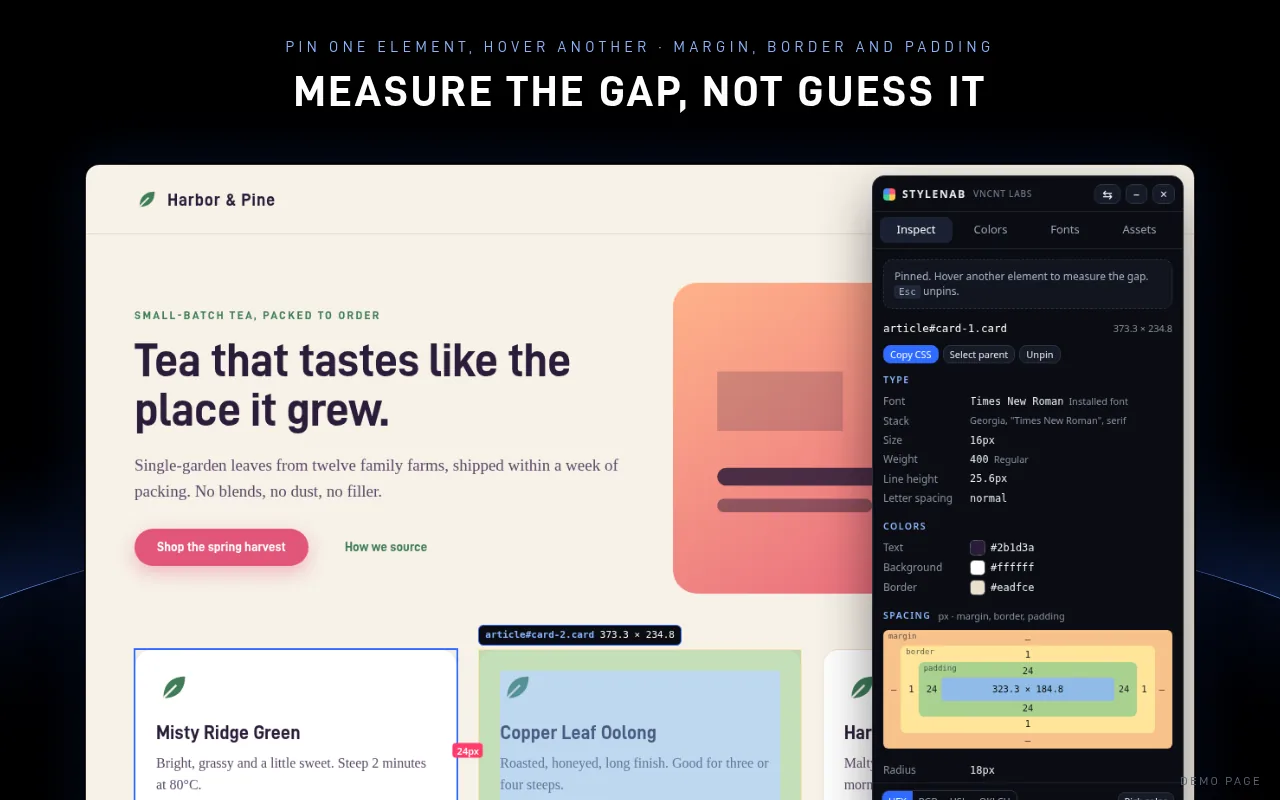
Stylenab is free, asks only for access to the tab you click it on, and sends nothing anywhere.
Get it on FirefoxMicrosoft Edge Add-ons: coming soon
Firefox is a trademark of Mozilla. Not affiliated with or endorsed by Mozilla.
Questions
Why doesn't margin plus margin equal the gap I see?
Vertical margins between blocks can collapse into one, and flex or grid gaps add space that isn't a margin at all. Measuring between the two boxes avoids the math.
Are the numbers in CSS pixels?
Yes. Values are CSS pixels as the page lays them out at the current zoom and window size.
Will clicking pin an element or follow the link?
In Stylenab's Inspect tab, clicks pin elements and don't follow links. Switch tabs or close the panel and the page works normally again.